Imagine discovering your organisation has been spending £66,000 annually on software licenses you don’t actually need, enough to fund an entire new position or purchase premium equipment. This scenario plays out repeatedly across businesses worldwide as they navigate the complex maze of Microsoft 365 licensing for business. With multiple plan tiers, overlapping features, and confusing pricing structures, choosing the right license isn’t just about functionality—it’s about strategic financial management that can save thousands while maintaining the security and compliance your business demands.
Key Takeaways
- Business Premium offers the best value for organisations under 300 users, providing enterprise-grade security at small business pricing (approximately £22/$22 per user monthly)
- F3 licenses for frontline workers can generate savings of £8-10 per user monthly compared to full licenses, potentially saving thousands annually
- E3 requires security add-ons to match Business Premium’s protection, making it more expensive despite the higher base price
- E5 is essential only for high-compliance environments requiring advanced threat protection, eDiscovery, and complete audit trails
- Right-sizing licenses based on actual user needs rather than perceived prestige can save organisations tens of thousands of pounds annually
Understanding Microsoft 365 Licensing for Business in 2025
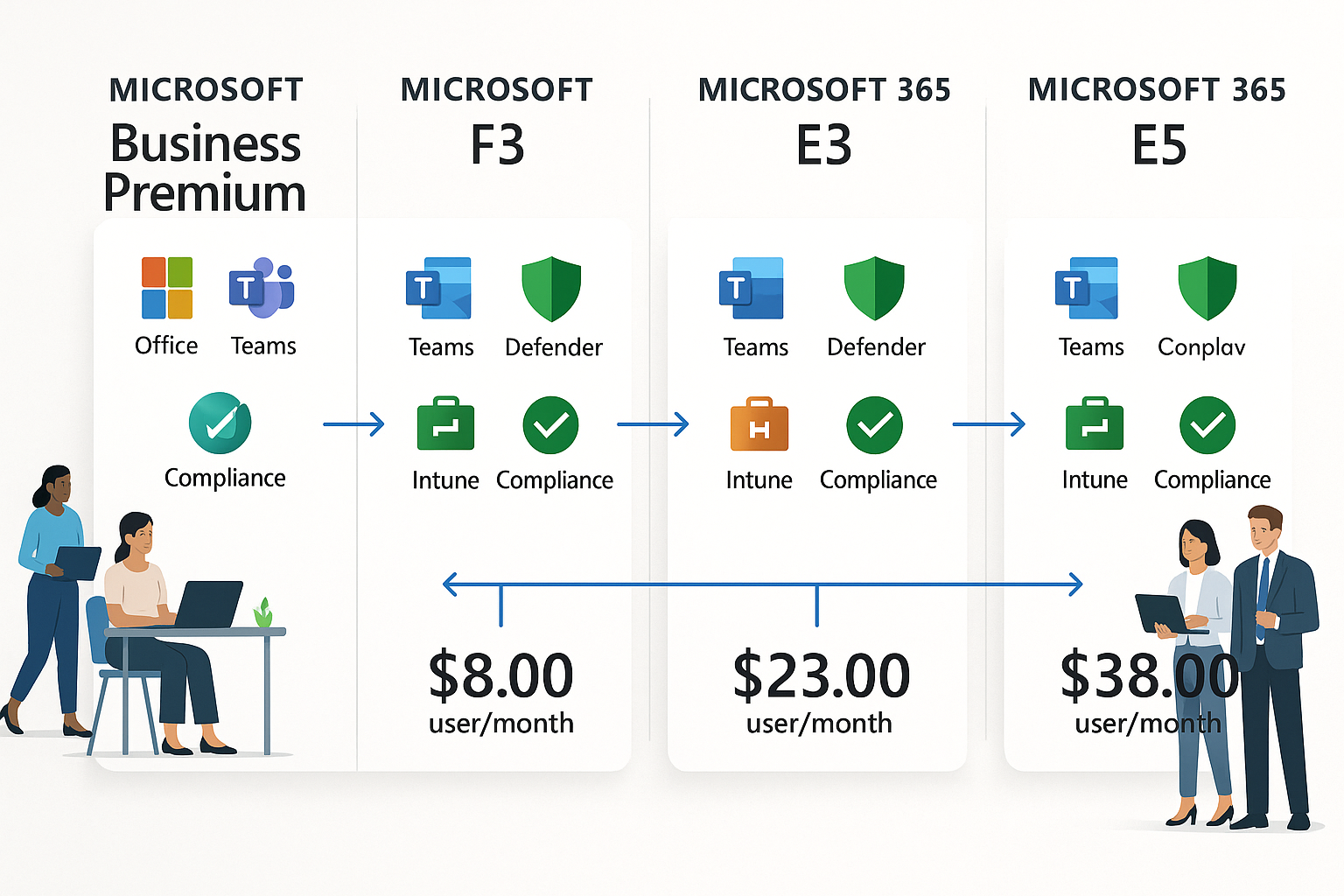
The Microsoft 365 licensing landscape underwent significant changes in 2025, making it more critical than ever to understand your options. Effective April 1, 2025, Microsoft implemented a 5% price increase for annual subscriptions with monthly billing across all plans. Additionally, beginning November 2025, Microsoft phased out Enterprise Agreement volume pricing tiers (Levels B-D), with all online-service customers now paying Level A list pricing, eliminating the previously available automatic 6-12% discount for large organisations.
These changes mean that strategic licensing decisions now carry even greater financial weight. Organisations must carefully evaluate their actual requirements rather than defaulting to higher-tier plans based on assumptions or sales recommendations.
The Teams Decoupling Impact
Microsoft decoupled Teams from core licensing to comply with global regulations, resulting in approximately a 10% price increase for organisations that require Teams functionality. However, this change also created opportunities: “No Teams” SKU licensing options are now available at lower price points, enabling organisations to reduce costs by licensing service accounts and non-collaborative roles without Teams access.
Microsoft 365 Business Plans: The Foundation for Small to Medium Organizations
For businesses with up to 300 users, the Business suite represents the most cost-effective entry point into the Microsoft 365 ecosystem. Understanding the three tiers helps organisations match capabilities to actual needs.
Business Basic: The Entry Point
Microsoft 365 Business Basic is priced at $6 per user/month and includes:
✅ Web and mobile Office apps (Word, Excel, PowerPoint)
✅ Professional business email through Exchange Online
✅ Microsoft Teams for collaboration
✅ 1 TB cloud storage per user via OneDrive
✅ 10+ additional apps for business needs
This plan works well for organisations where users primarily need email, file storage, and collaboration tools without requiring desktop Office applications. Consider Business Basic for:
- Administrative staff who work primarily in web browsers
- Service accounts that only need email functionality
- Temporary or contract workers with limited application needs
“Business Basic provides essential collaboration tools at minimal cost, but the lack of desktop applications limits productivity for knowledge workers who spend significant time in Office documents.”
Business Standard: Adding Desktop Power
Microsoft 365 Business Standard costs $12.50 per user/month and includes all Business Basic features plus:
- Desktop versions of Word, Excel, PowerPoint, and Outlook
- Collaborative workspaces with real-time co-authoring
- Enhanced email capabilities with the desktop Outlook client
The jump from Basic to Standard represents the most common upgrade path. Desktop applications provide significantly better performance, offline access, and advanced features that power users require. For organisations where employees spend substantial time creating presentations, analysing data in Excel, or managing complex documents, the additional $6.50 monthly investment delivers clear productivity returns.
Business Premium: The Sweet Spot for Microsoft 365 Licensing for Business
Microsoft 365 Business Premium is priced at $22 per user/month and represents the optimal balance of functionality, security, and cost-effectiveness for most small to medium-sized businesses. This plan delivers everything organisations actually need:
Complete Office Suite
- Full desktop and mobile Office applications
- Web-based versions for anywhere access
- Unlimited OneDrive storage (up to 1 TB per user)
Communication & Collaboration
- Email through Exchange Online with 50 GB mailboxes
- Microsoft Teams for chat, meetings, and calling
- SharePoint for document management and intranet
Enterprise-Grade Security
- Microsoft Intune for comprehensive device management
- Defender for Business providing enterprise-grade threat protection
- Data Loss Prevention (DLP) to prevent sensitive information leakage
- Conditional Access policies controlling how and where users access data
- Multi-factor authentication protects against credential theft
Real-World Example: The Law Firm That Saved £66,000
Consider a law firm with 200 users who were initially assigned E5 licenses simply because it “sounded more compliant.” After a proper licensing audit revealed that their actual requirements were email, Teams collaboration, document management, and robust security, all of which are included in Business Premium, they made the switch.
Annual savings calculation:
- E5 cost: £52 × 200 users × 12 months = £124,800
- Business Premium cost: £22 × 200 users × 12 months = £52,800
- Total annual savings: £72,000
Even accounting for currency fluctuations and the 2025 price increases, this organisation saved approximately £66,000 annually, nearly the cost of a premium vehicle, while retaining all the security features they actually utilised.
“Business Premium provides enterprise-grade protection at a small business price point, with no complex add-ons required for basic security needs.”
Frontline Workers: The F3 Solution for Microsoft 365 Licensing for Business
One of the most overlooked licensing options in the Microsoft 365 ecosystem is the F3 license (formerly F1), specifically designed for frontline and shift workers. If your organisation includes warehouse staff, manufacturing floor workers, retail employees, healthcare workers, or anyone who doesn’t require a full desktop computing environment, you’re likely overspending dramatically.
What F3 Includes
The F3 license provides:
- Web and mobile versions of Office applications
- Teams, Outlook, SharePoint, and OneDrive access
- 2GB mailbox capacity (sufficient for basic communication)
- Basic security and device policies through Intune
- Support for compliance policies, multi-factor authentication, and Conditional Access
Who Should Use F3 Licenses?
F3 licenses are ideal for employees who:
- Work primarily on mobile devices or shared workstations
- Don’t create complex Office documents regularly
- Need communication tools (Teams, email) but not desktop applications
- Require security controls but not complete productivity suites
Industries that benefit most:
- Manufacturing (factory floor workers)
- Warehousing and logistics (inventory staff)
- Healthcare (nurses, medical assistants)
- Retail (store associates)
- Hospitality (restaurant and hotel staff)
The Cost Savings Are Substantial
For a manufacturing company with 500 employees, where half work on the factory floor without regular computer access, the numbers are compelling:
Before optimisation:
- 500 users × Business Premium (£22/month) = £11,000 monthly
- Annual cost: £132,000
After F3 implementation:
- 250 office workers × Business Premium (£22/month) = £5,500
- 250 frontline workers × F3 (£12/month) = £3,000
- Total monthly: £8,500
- Annual cost: £102,000
- Annual savings: £30,000
This represents a 23% reduction in licensing costs without sacrificing security posture or compliance capabilities.
“The critical insight: F3 licenses maintain robust security controls while eliminating costs for features your frontline workers will never utilize.”
The 300-User Threshold: Transitioning to Enterprise Licensing
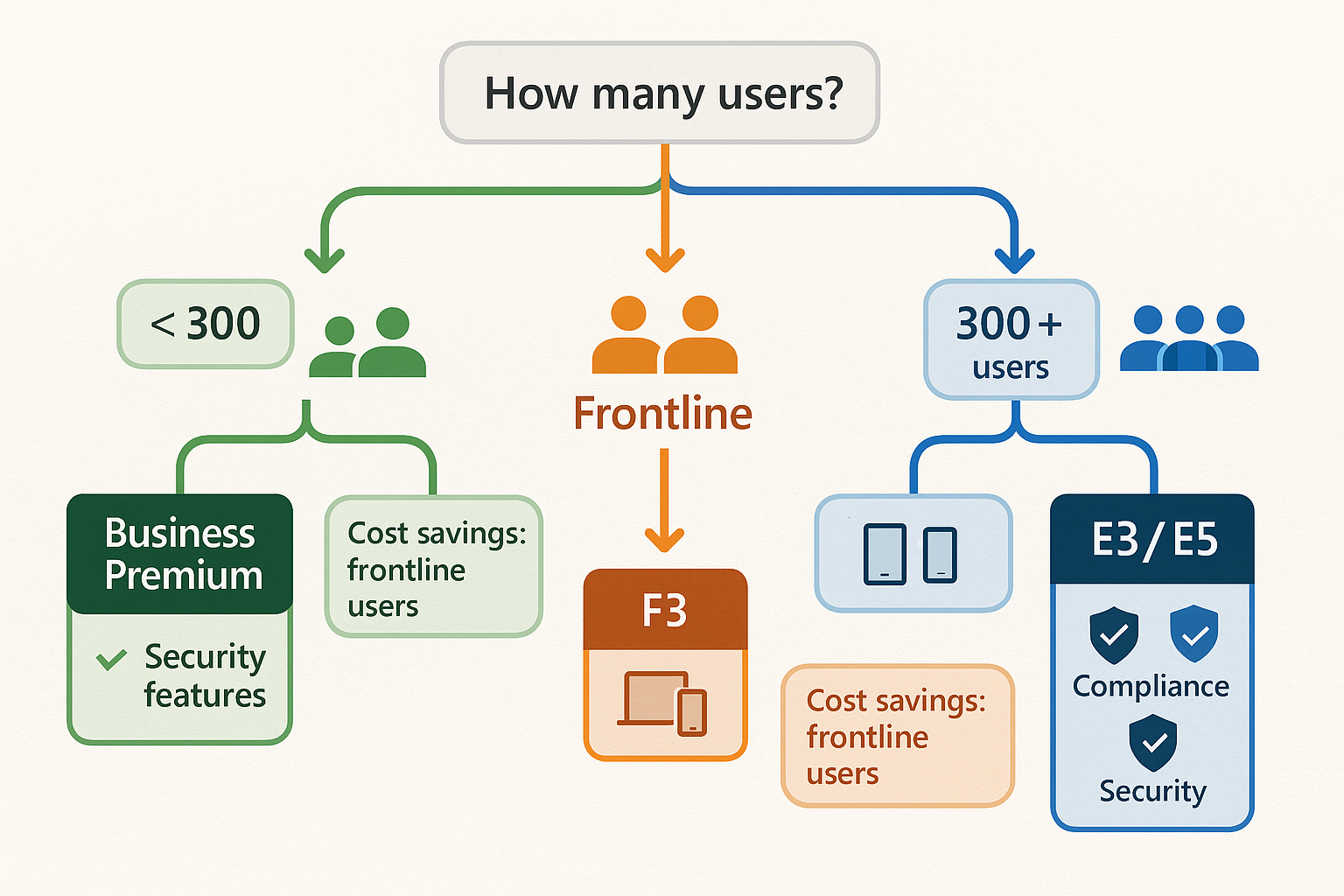
Microsoft imposes a hard limit of 300 users on Business Premium licenses. When your organisation reaches user 301, you’ll encounter a firm barrier—the system simply won’t allow additional Business Premium licenses. This threshold represents a critical decision point for growing organisations.
Microsoft 365 E3: Enterprise Foundation
At this growth stage, organisations must transition to E3 or E5 licensing. Microsoft 365 E3 costs $33.75 per user/month (approximately £27-28 depending on exchange rates) and shares remarkable similarity with Business Premium:
What E3 Includes:
✅ Identical Office applications (desktop, web, mobile)
✅ Same Teams, SharePoint, and OneDrive functionality
✅ Equivalent Intune capabilities for device management
✅ Unlimited OneDrive storage (major advantage over Business Premium’s 1TB limit)
✅ Advanced compliance features and eDiscovery
✅ Information protection and governance tools
The Security Gap You Must Address
However, there’s a significant catch: E3 actually removes Defender for Business, meaning you receive less built-in security despite paying more. To match Business Premium’s protection level, you must add:
- Defender for Endpoint Plan 1 (~£4.50/user/month)
- Defender for Office 365 Plan 1 (~£1.50/user/month)
Total E3 cost with equivalent security:
- Base E3: £28/user/month
- Defender for Endpoint P1: £4.50/user/month
- Defender for Office 365 P1: £1.50/user/month
- Total: £34/user/month (£408 annually)
Compare this to Business Premium at approximately £22/user/month (£264 annually). For 200 users, this represents over £28,800 in additional annual expenditure to achieve the same level of security.
When E3 Makes Sense
Despite the higher cost, E3 becomes necessary when:
- Your organisation exceeds 300 users (no choice)
- Users require more than 1TB of OneDrive storage
- Advanced compliance and eDiscovery capabilities are essential
- You need enterprise-scale management across thousands of users
“E3 excels at scalability—it grows beautifully beyond 300 users—but the pricing scales proportionally.”
Microsoft 365 E5: Maximum Security for High-Compliance Environments
Microsoft 365 E5 is the pinnacle of the licensing hierarchy, designed for organisations with stringent security and compliance requirements. At $54.75 per user/month (approximately £44-46), it costs more than double Business Premium’s price. Finance, legal, healthcare, and other regulated industries typically require E5’s comprehensive capabilities.
What E5 Adds Beyond E3
E5 includes everything from E3, plus advanced security and compliance tools:
Advanced Threat Protection:
- Defender for Endpoint Plan 2: Complete visibility across every device, detecting and containing cyber threats before propagation with automated investigation and response
- Defender for Office 365 Plan 2: Automatic investigation and response to phishing and malware attacks in both email and Teams, including threat simulation and training
- Defender for Cloud Apps: Comprehensive visibility into which applications your users access and controls over company data movement across cloud services
Compliance & Governance:
- Microsoft Purview: Complete audit trails for emails, chats, and documents
- Advanced eDiscovery: Legal hold, case management, and content search for litigation
- Data classification and labelling: Automatic identification and protection of sensitive information
- Insider risk management: Detection of potentially malicious or inadvertent insider threats
Productivity Enhancements:
- Microsoft Teams Phone: External calling directly within Teams (replaces traditional phone systems)
- Power BI Pro: Advanced reporting, dashboards, and business intelligence
- MyAnalytics: Personal productivity insights and recommendations
Who Actually Needs E5?
E5 is the appropriate choice when your company requires:
✅ Complete visibility and control over all data and communications
✅ Automated threat detection and response across endpoints, email, and cloud apps
✅ Comprehensive audit trails for regulatory compliance
✅ Advanced insider risk detection for sensitive environments
✅ Integrated phone system replacing traditional telephony
Industries that commonly require E5:
- Financial services (banking, investment firms)
- Legal practices handling sensitive cases
- Healthcare organisations with HIPAA requirements
- Government agencies with classified information
- Research institutions with intellectual property concerns
The E5 Cost Reality Check
For a 100-user organisation:
E5 annual cost:
- £46 × 100 users × 12 months = £55,200
Business Premium annual cost:
- £22 × 100 users × 12 months = £26,400
Difference: £28,800 annually
This premium buys peace of mind and comprehensive protection. If “compliance” appears in someone’s job title and they’re demanding threat analysis, automatic investigation, data classification, and extensive risk reports, E5 is likely justified.
“E5 is the appropriate choice when your organization requires complete visibility, control, and traceability—not when someone simply wants the ‘best’ license without understanding the actual requirements.”
Strategic Microsoft 365 Licensing for Business: Making the Right Decision
Your licensing strategy should follow this decision framework based on actual organisational needs:
Decision Matrix
| Scenario | Recommended License | Monthly Cost | Best For |
|---|---|---|---|
| Email and web apps only | Business Basic | $6/user | Light users, service accounts |
| Desktop Office needed | Business Standard | $12.50/user | Standard office workers |
| Security + full features (<300 users) | Business Premium | $22/user | Most SMBs, optimal value |
| Frontline/shift workers | F3 | ~$12/user | Warehouse, retail, manufacturing |
| 300+ users, enterprise scale | E3 + Defender | ~$34/user | Growing organizations |
| High compliance requirements | E5 | $54.75/user | Regulated industries |
The Licensing Audit Process
To optimise your Microsoft 365 licensing for business, follow these steps:
Step 1: Categorise Your Users
- Executive/knowledge workers: Full productivity suite required
- Standard office workers: Desktop applications needed
- Frontline workers: Mobile/web access sufficient
- Service accounts: Email-only requirements
Step 2: Assess Security Requirements
- Do you operate in a regulated industry?
- What compliance frameworks apply (GDPR, HIPAA, SOC 2)?
- Do you need advanced threat protection?
- Are insider risks a concern?
Step 3: Calculate Current Spend
- Total users × current license cost = annual expenditure
- Identify over-licensed users (E5 users doing basic tasks)
- Identify under-licensed users (security gaps)
Step 4: Model Alternative Scenarios
- Mixed licensing: Premium for office, F3 for frontline
- Right-sized enterprise: E3 with targeted E5 for the compliance team
- Security add-ons: E3 + Defender vs. Business Premium
Step 5: Implement and Monitor
- Transition users to appropriate licenses
- Set quarterly reviews to catch changes
- Monitor usage through the Microsoft 365 admin centre
Common Licensing Mistakes to Avoid
❌ Licensing everyone at the highest tier “just to be safe”
❌ Ignoring F3 options for frontline workers
❌ Forgetting security add-ons when moving from Business Premium to E3
❌ Not reviewing licenses when employees change roles
❌ Paying for Teams when users don’t need collaboration features
Volume Licensing and Enterprise Agreements
For larger organisations, understanding Enterprise Agreements can unlock additional savings and benefits.
Enterprise Agreement Benefits
Organisation with 250+ licenses, you qualify for volume licensing discounts and receive:
- Negotiated pricing (though less favourable after 2025 changes)
- Advance notice of pricing changes
- Flexible licensing management
- Dedicated account management
- Training and deployment support
The 2025 Volume Licensing Changes
The November 2025 elimination of volume pricing tiers (Levels B-D) significantly impacted large organisations that previously received automatic 6-12% discounts. All customers now pay Level A list pricing, making it even more critical to:
- Negotiate custom agreements for extensive deployments
- Optimise license mix to reduce overall spend
- Consider multi-year commitments for price protection
- Leverage partner relationships for additional discounts
Microsoft 365 Copilot: The AI Add-On
Microsoft 365 Copilot represents the newest licensing consideration for 2025. This AI-powered assistant requires a separate license purchase and can only be added to qualifying Microsoft 365 plans through the Microsoft 365 admin centre.
Copilot Requirements and Pricing
- Cost: Approximately $30/user/month additional
- Prerequisites: Requires E3, E5, Business Standard, or Business Premium base license
- Functionality: AI assistance in Word, Excel, PowerPoint, Outlook, and Teams
Should You Add Copilot?
Copilot makes sense for:
- Knowledge workers spending significant time creating content
- Analysts working with complex data in Excel
- Teams that benefit from AI-powered meeting summaries
- Organisations seeking productivity gains that justify the 50%+ cost increase
However, don’t rush into Copilot without:
- Testing with a pilot group first
- Measuring actual productivity improvements
- Ensuring users receive proper training
- Confirming your base licensing is already optimised
Practical Implementation: A Step-by-Step Guide
Month 1: Assessment and Planning
Week 1-2: Inventory Current State
- Export all current licenses from the Microsoft 365 admin centre
- Categorise users by role and actual application usage
- Review security and compliance requirements
- Document current annual licensing costs
Week 3-4: Design Target State
- Map users to appropriate license types
- Calculate projected costs for the new licensing model
- Identify quick wins (immediate over-licensing)
- Create transition timeline
Month 2: Pilot and Validation
Week 1-2: Pilot Program
- Select 20-30 users across different categories
- Implement new licensing for the pilot group
- Monitor for functionality gaps or issues
- Gather feedback on user experience
Week 3-4: Refinement
- Adjust licensing model based on pilot results
- Finalise security add-on requirements
- Confirm cost savings projections
- Prepare communication for full rollout
Month 3: Full Implementation
Week 1-2: Phased Rollout
- Begin with non-critical users
- Transition frontline workers to F3
- Right-size office workers to appropriate tiers
- Monitor help desk tickets for issues
Week 3-4: Optimisation
- Complete remaining transitions
- Verify all users have appropriate access
- Document new licensing standards
- Establish a quarterly review process
Cost Optimisation Strategies for 2025 and Beyond
Strategy 1: Mixed Licensing Approach
Don’t assume all users need the same license. A 500-person organisation might optimise as:
- 50 executives and compliance team: E5 (£46/user) = £2,300/month
- 200 knowledge workers: Business Premium (£22/user) = £4,400/month
- 250 frontline workers: F3 (£12/user) = £3,000/month
Total: £9,700/month (£116,400 annually)
Compared to all Business Premium:
- 500 users × £22 = £11,000/month (£132,000 annually)
Savings: £15,600 annually (12% reduction)
Strategy 2: “No Teams” SKUs for Service Accounts
For service accounts, shared mailboxes, and non-collaborative roles, consider “No Teams” SKU options at approximately 10% lower cost:
- 50 service accounts × £20/month (vs. £22) = savings of £100/month
- Annual savings: £1,200
Strategy 3: Annual Commitment vs. Monthly Billing
Despite the 5% price increase on annual subscriptions with monthly billing implemented in April 2025, yearly commitments still typically offer better overall value through:
- Predictable budgeting
- Protection from mid-year price increases
- Reduced administrative overhead
Strategy 4: Regular License Reviews
Implement quarterly license audits to:
- Remove licenses from departed employees promptly
- Downgrade users who changed to less demanding roles
- Identify unused licenses (users on extended leave)
- Catch duplicate or overlapping subscriptions
A 300-user organisation finding just 10 unused E5 licenses generates:
- 10 users × £46/month × 12 months = £5,520 in recovered costs
Conclusion: Taking Action on Your Microsoft 365 Licensing for Business
The fundamental principle of effective Microsoft 365 licensing for business is simple: match your licensing to actual requirements rather than perceived prestige or vague compliance concerns. The difference between strategic licensing and default recommendations can represent tens of thousands of pounds annually, which could fund new initiatives, hire additional staff, or improve your bottom line.
Your Next Steps
Immediate Actions (This Week):
- Export your current license inventory from the Microsoft 365 admin centre
- Calculate your total annual licensing spend across all Microsoft 365 subscriptions
- Categorise users into knowledge workers, frontline workers, and service accounts
- Identify your top 10 over-licensed users (people with E5 who only use email and Office)
Short-Term Actions (This Month):
- Assess your security and compliance requirements objectively
- Model 2-3 alternative licensing scenarios with cost projections
- Launch a pilot program with 20-30 users on optimised licenses
- Consult with a Microsoft licensing specialist or trusted partner
Long-Term Actions (This Quarter):
- Implement your optimised licensing strategy across the organisation
- Establish quarterly review processes to maintain optimisation
- Document your licensing standards for future hiring and role changes
- Educate stakeholders on the business value of strategic licensing
The Bottom Line
Whether you’re a 50-person startup choosing your first Microsoft 365 plan or a 5,000-person enterprise optimising existing deployments, the licensing decisions you make today will impact your organisation for years to come. Business Premium offers exceptional value for most small to medium businesses with under 300 users. F3 licenses can save frontline workers thousands per month. E3 provides enterprise scalability but requires security add-ons. E5 delivers comprehensive protection for high-compliance environments but only when those capabilities are actually needed.
Audit your current deployments, identify users with excessive licensing, and right-size your subscriptions. The resulting cost savings, potentially tens of thousands of pounds annually, can be redirected toward initiatives that genuinely enhance your business capabilities, such as better security tools, employee training, infrastructure improvements, or strategic technology investments.
The question isn’t whether you can afford to optimise your Microsoft 365 business licensing, it’s whether you can afford not to.

Nomi
https://nmaqsood.com/Noman Maqsood (Nomi) is a Senior IT Engineer with 7+ years in cloud, networking, and hybrid infrastructure. Azure certified. He writes about practical IT solutions, no jargon, just what actually works.